

What Is Free Adblocker Browser and How Does It Work?


Free Adblocker Browser is a modern web browser built with ad blocking and privacy features. It helps users browse faster, avoid distractions, and reduce intrusive ads. The browser also limits third-party tracking and provides extra online protections. It offers a strong alternative to traditional browsers that rely on extensions or add-ons for similar capabilities.
Overview of Free Adblocker Browser
Free Adblocker Browser blocks ads and trackers from the first use. Users do not need to install extra ad blocker extensions. This ensures a smoother browsing experience right away.
Unlike some competitors, which require custom settings or third-party tools, Free Adblocker Browser’s core ad blocking and privacy protections are built in. They work automatically, so users spend less time tweaking settings and more time browsing.
How Free Adblocker Browser Works
The browser blocks advertising and tracking resources at the network request level before they reach the page. Most ads and tracking scripts come from external domains, not the website itself.
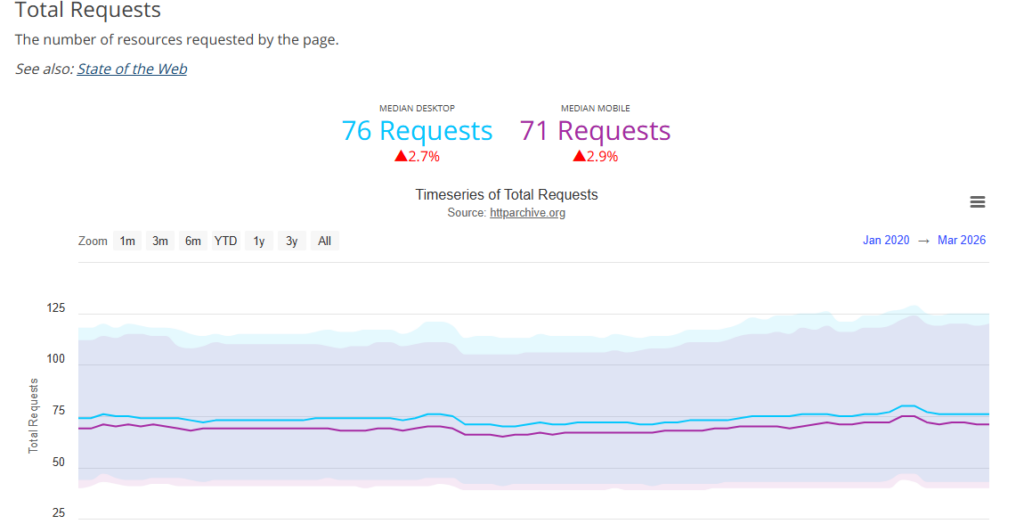
Modern websites load many third-party resources, especially for advertising and analytics. Data from the HTTP Archive shows these scripts account for a significant portion of page requests and transferred data. Free Adblocker Browser stops these requests, reducing unnecessary network activity and limiting third-party code execution.
Blocking Ads Early
Online advertisements often appear as JavaScript files, iframes, or externally hosted media assets. These requests load from advertising or tracking domains and execute when the page opens.
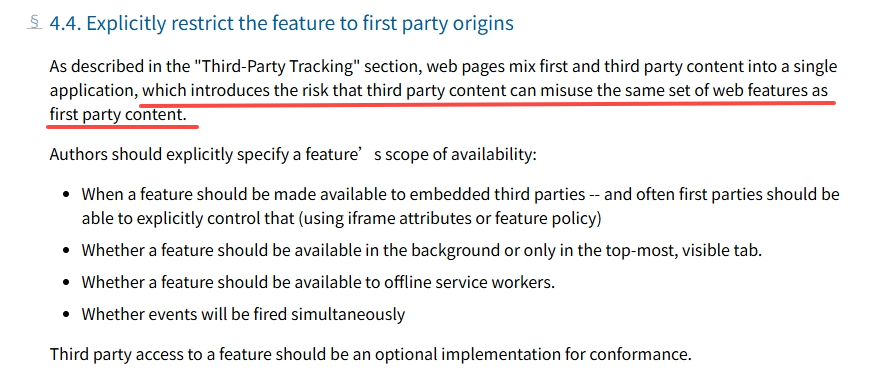
Research from the World Wide Web Consortium shows third-party scripts can introduce security, privacy, and performance risks. Free Adblocker Browser prevents known ad requests from loading. This stops banners, pop-ups, and auto-playing media before users see them.
Limiting Cross-Site Tracking
Tracking technologies collect browsing behavior across multiple websites. They often use invisible pixels, cookies, and scripts. Studies show many websites communicate with dozens of third-party trackers during a single page visit.
The Browser blocks these tracking requests. It reduces cross-site data sharing, helping protect user privacy while browsing the web.
Reducing Page Load and Data Usage
Ads and tracking content increase page size, network requests, and device resource use. HTTP Archive data shows third-party content contributes significantly to overall page weight, especially on mobile devices.
By blocking unnecessary requests, Free Adblocker Browser allows pages to load with fewer resources. This reduces bandwidth usage and improves browsing efficiency, even on slower connections.
Browser-Level Protection by Default
Unlike approaches that rely on add-ons or extensions, Free Adblocker Browser integrates ad blocking directly into the browser. Browser-level blocking stops unwanted content earlier in the loading process.
This prevents performance issues and protects privacy more consistently. MDN Web Docs explains that controlling network requests at the browser level provides more effective filtering than scripts that run only on the page.
Free to Use
Free Adblocker Browser is free to download and use. It includes built-in ad blocking and basic privacy protections without payment or subscription.
The browser also offers an optional VPN. New users can try it with a free trial. After the trial, continued VPN use requires a subscription.
This setup allows users to enjoy ad blocking and privacy tools at no cost while offering extra protection for those who need it.
Built-In VPN Features
A virtual private network (VPN) encrypts internet connections and hides the user’s IP address. This makes online activity harder to monitor by ISPs or public Wi-Fi operators.
The VPN in Free Adblocker Browser works as an optional layer of protection. It complements the browser’s ad blocking and privacy features instead of replacing them.
Privacy and Data Handling
Free Adblocker Browser minimizes unnecessary data collection. It blocks known tracking technologies and avoids storing sensitive browsing information. The browser does not rely on user profiling to function.
Why Choose Free Adblocker Browser?
It gives users a quieter, cleaner, and more private browsing experience. Users do not need to constantly fight ads or adjust settings.
It is an ideal choice for people who:
- Are tired of YouTube ads
- Feel overwhelmed by ads on everyday websites
- Care about online privacy
- Prefer simple tools that work by default
- Occasionally need extra protection
[url=https://kapsulnyj-dom-1.ru]Капсульный дом[/url] — можно ли его перевезти на другой участок при необходимости?