

How to Block Ads on Recipe Sites (Step-by-Step Guide)

If you love cooking, then you’ve probably visited popular food websites for inspiration. However, more often than not, these sites are filled with intrusive ads. As a result, many users are now actively looking for ways to block ads on recipe sites and enjoy a smoother browsing experience.
Fortunately, there’s a simple solution. In this guide, you’ll learn exactly how to do it using Free Adblocker Browser, step by step.
Why Recipe Sites Are Filled with Ads
To begin with, it’s important to understand why recipe sites are so ad-heavy.
Most platforms rely on advertising as their primary revenue source. Therefore, websites like:
…tend to include multiple layers of ads throughout the page.
In particular, you’ll often encounter:
- Sticky banner ads that follow you while scrolling
- Auto-playing video ads that interrupt your focus
- Pop-ups that appear unexpectedly
- Tracking scripts that slow everything down
Consequently, what should be a simple cooking experience quickly becomes frustrating.
What Happens Without Ad Blocking
Now that we understand the cause, let’s take a closer look at the actual browsing experience.
As you can see, several common issues appear:
- First of all, the actual recipe is often buried under ads
- In addition, videos may start playing automatically
- Meanwhile, page loading speed becomes noticeably slower
- Worst of all, constant interruptions make it hard to focus
Because of this, more users are searching for reliable ways to block ads on recipe sites.
The Easiest Way: Use Free Adblocker Browser
So, what’s the best solution?
Instead of installing multiple extensions or adjusting complicated settings, you can simply switch to Free Adblocker Browser. In other words, it’s an all-in-one solution designed for convenience.
What Makes It Different?
Unlike traditional browsers, Free Adblocker Browser offers built-in features. As a result, you don’t need any extra tools.
For example:
- Automatic ad blocking – removes banners, pop-ups, and video ads instantly
- Faster page loading – since unnecessary scripts are blocked
- Privacy protection – prevents trackers from collecting your data
- No extensions required – everything works right away
Therefore, it’s ideal for users who want a hassle-free experience.
Step-by-Step: How to Block Ads on Recipe Sites
Now, let’s walk through the process step by step.
Step 1: Download Free Adblocker Browser
First, Click here to install the browser on your device.
Step 2: Open Your Favorite Recipe Site
Next, visit popular platforms such as:
- Allrecipes
- Food Network
- Delish
Step 3: Let the Browser Do the Work
After that, the browser automatically blocks ads without any manual setup.
Step 4: Enjoy a Clean Experience
Finally, you can focus entirely on the recipe:
- Ingredients are easy to find
- Instructions are clearly visible
- Scrolling feels smooth and fast
Before vs After: Real Experience
To better understand the difference, let’s compare both scenarios.
Without Free Adblocker Browser

With Free Adblocker Browser
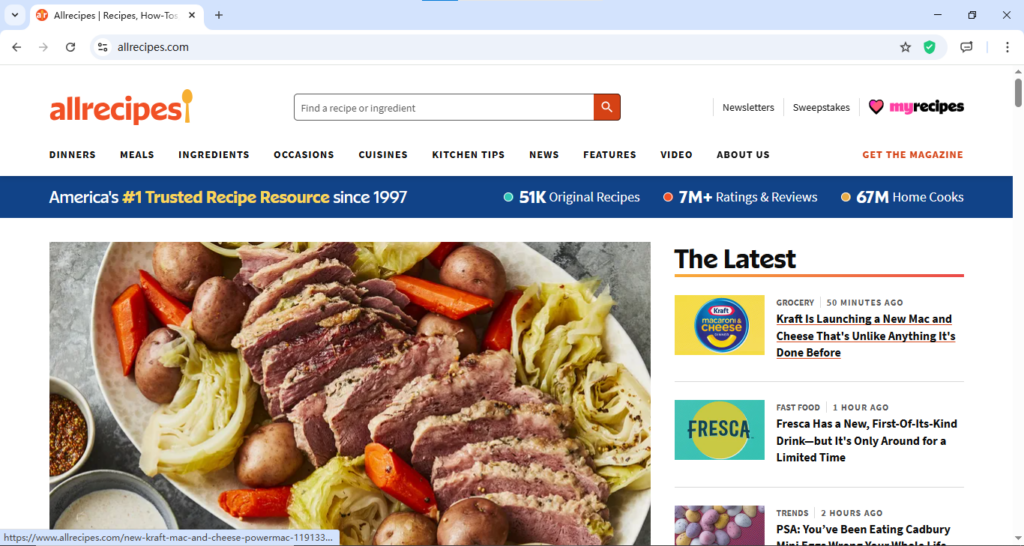
Thus, the improvement is immediate and noticeable.
Bonus: Improve Privacy While Cooking Online
Beyond blocking ads, there’s another important benefit.
In many cases, recipe websites track user behavior through third-party scripts. For instance, they may collect browsing habits or interaction data.
However, with Free Adblocker Browser:
- Tracking cookies are blocked automatically
- Data collection is reduced
- Your privacy remains protected
In other words, when you block ads on recipe sites, you’re also taking control of your personal data.
Final Thoughts
All things considered, browsing recipe websites doesn’t have to be frustrating.
By choosing Free Adblocker Browser, you can:
- Easily block ads on recipe sites
- Significantly improve loading speed
- Enjoy a clean, distraction-free experience
Ultimately, if you frequently visit cooking websites, this is one of the simplest yet most effective upgrades you can make.
Как быстро строится [url=https://kapsulnyj-dom-1.ru]капсульный дом[/url] по сравнению с традиционным?