
Filter noise keep only posts that matter
Recently we happened to some users’ feedback: there are two many promotional posts and feeds, as well as ads.
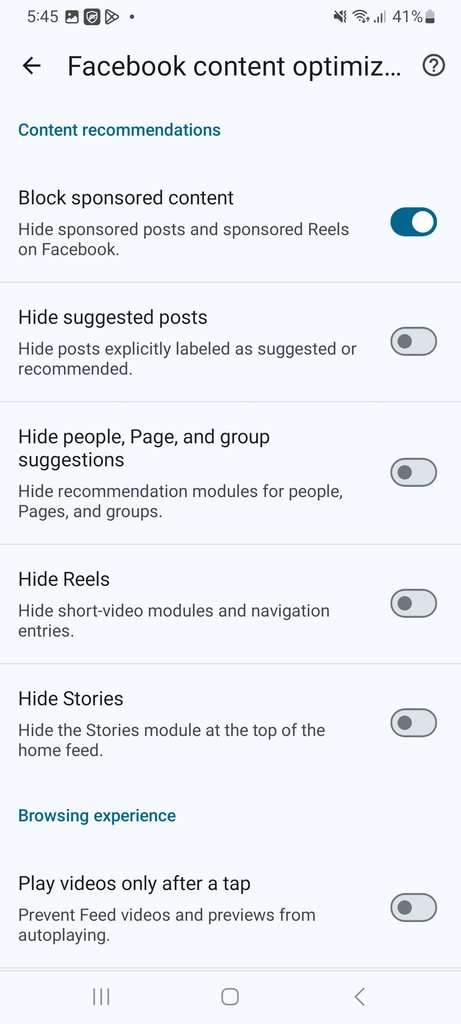
So free adblocker browser just enabled a new function “social media content filter” for our users:
- help to filter the sponsored content on social media
- help to hide the suggested posts
- help to hide the people, page, and group suggestions
- help to hide the reels and stories
- the last, help to set the “play videos” only after the tap, instead of play videos immediately after open the website page.
How to use?
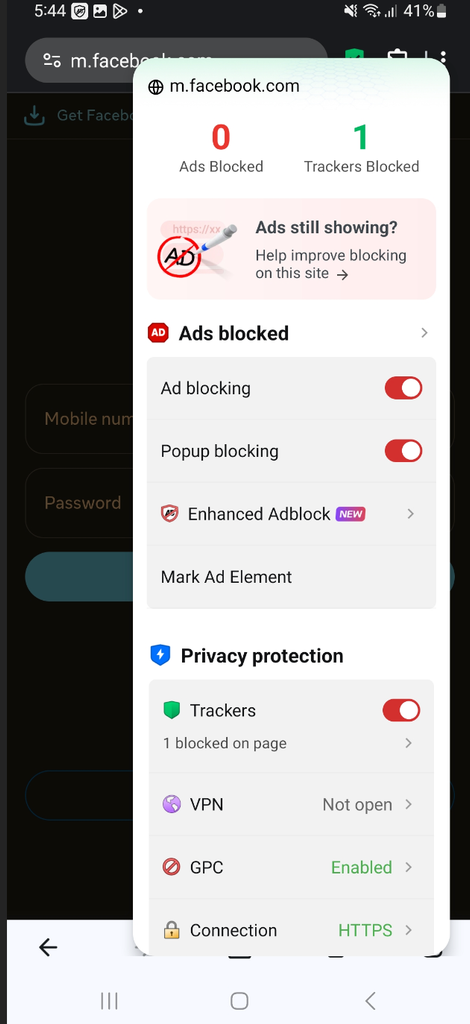
Step 1 open the targeted website, then click on the green check mark, then choose the “Enhanced Adblock”
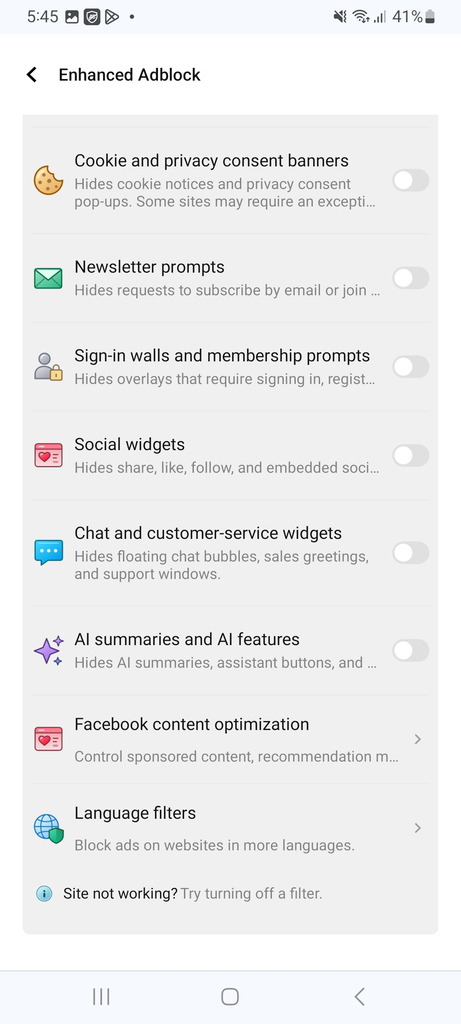
Step 2 Scroll down, until you see the “Facebook content optimization”
Step 3 Set the filter rules as you wish.
Then it will be working.
More ideas for your reference
How do you take back control of your social feed from ads and algorithmic recommendations?
Social feeds are designed to maximize engagement, not relevance. What that means in practice is a steady stream of promoted posts, “recommended for you” content, autoplaying video, and short-form video modules competing for the same attention as the people you actually chose to follow.
If you have ever opened a social app just to check on friends and ended up twenty minutes later watching short videos you never searched for, the problem is structural, not personal.
The core problems
- How do you stop promoted posts from taking over the feed? Promoted content is interleaved with organic posts from people you follow, which makes it difficult to tell what is a genuine update from what is an advertisement.
- What if the algorithm stops deciding what you see? Recommendation engines prioritize engagement signals over stated preference. The result is a feed that feels curated by a system nobody asked to be curated by.
- Why do videos start playing before you decide to watch them? Autoplay turns a passive scroll into an active viewing session. Combined with short-form video feeds, it becomes the single largest contributor to unplanned time spent.
- How do you stop the app from constantly asking you to install or switch? Repeated install and open-app prompts interrupt whatever you were doing, and each one is a conversion attempt disguised as a convenience.
What a content-optimization layer can do
The features below address each of the problems above directly, at the feed level rather than through manual discipline:
- Block promotional content — Removes promoted posts and promoted short-form video from the feed entirely, so organic content from real connections stays visually distinct.
- Hide recommended posts — Filters out posts carrying the “recommended for you” label, which is the main surface through which algorithmic suggestions reach the user.
- Hide people, page, and group recommendations — Suppresses recommendation modules for accounts, pages, and groups, removing the prompts to follow entities you did not search for.
- Hide short-form video — Removes both the short-video module in the feed and its navigation entry, eliminating the highest-engagement surface on the platform.
- Hide Stories — Removes the Stories module from the top of the home feed, clearing the row of circular thumbnails that currently occupies the first screen position on launch.
- Videos play only after click — Disables autoplay for feed videos and previews. Content loads but does not start until explicitly selected.
- Block app install and open prompts — Suppresses the recurring prompts asking you to install the mobile app or switch from an in-browser session.
The underlying principle
Each of these settings removes one decision the platform was making on your behalf. The result is not an empty feed — it is a feed containing only what you chose to subscribe to, delivered without autoplay or conversion pressure.
Curating your own attention is not a productivity trick. It is a reasonable default.